
Business Process Automation: BPA Guide for Modern Teams

Business Process Automation: BPA Guide for Modern Teams
Summary
Business process automation (BPA) replaces manual, repetitive tasks with technology-enabled workflows. In this article you will learn what BPA is, the technologies behind it, the benefits of automation and how to implement it step by step.
Are you looking for ways to eliminate unnecessary workload while improving your team's efficiency? Automation could be the solution here. Automating recurring tasks saves the team time and can even help avoid small errors in everyday work. And when it comes to efficiency, there is nothing better than finally having more time again.
In this article, we'll explore business process automation, explaining the term, the benefits of implementing your own system, and examples of common tasks you can automate.
What is meant by business process automation?
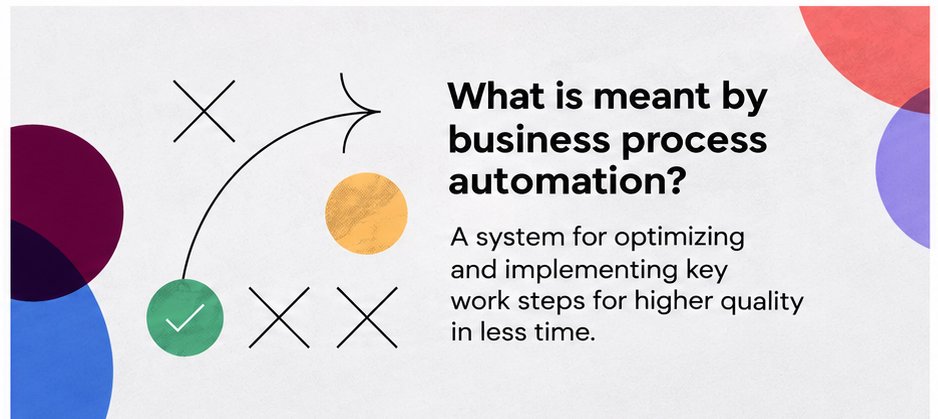 What is meant by business process automation: A system for optimizing and implementing key work steps for higher quality in less time
Business Process Automation (BPA) replaces manual, error-prone tasks with structured digital handoffs. For foundational design principles, review our guide to business process automation fundamentals.
Business process automation (BPA) is the use of technology to complete repetitive tasks in an organization without manual intervention. Instead of burdening a team member with routine work, a tool takes over these tasks automatically.
There are many different methods in the field of automation. From business process management to robotic process automation, it's important that you know how to distinguish between common terms.
Business Process Automation (BPA) vs. Business Process Management (BPM)
Business process automation is often confused with Business Process Management (BPM) - and for good reason. Because business process management is the generic term for various automation technologies.
BPM is the discipline in which people use various methods to discover, model, analyze, measure, improve, optimize and automate business processes. BPA is therefore only a small part of BPM.
Feature BPA BPM RPA Focus Automation of recurring tasks Holistic process management Software robots for structured tasks Scope Individual workflows Company-wide processes Rule-based activities Technology workflow tools, AI modeling, analysis, optimization software bots, AI Worth reading: The guide for getting started with business process management
Business Process Automation (BPA) vs. Robotic Process Automation (RPA)
| Architecture Tier | Strategic Scope | Primary Technology | Typical Implementation Use Case |
|---|---|---|---|
| Business Process Management (BPM) | End-to-end organizational modeling and continuous process redesign | Analytical frameworks, value-stream mapping, and process mining | Restructuring global procurement or supply chain operations |
| Business Process Automation (BPA) | Streamlining holistic multi-system workflows and business logic | Cloud APIs, webhook integrations, and rule-based workflow engines | Customer onboarding, invoice approvals, and contract intake |
| Robotic Process Automation (RPA) | Emulating human user interface interactions on legacy desktop software | Surface automation bots, screen scrapers, and optical character recognition | Transcribing legacy mainframe records into modern web systems |
Even though the two terms are similar, there are some differences. While BPM is a holistic approach that uses technology-enabled automation, RPA (Robotic Process Automation (RPA)) is a specific approach that uses software robots and artificial intelligence.
By definition, RPA is a form of business process automation based on metaphorical software robots or artificial intelligence.
Technologies and AI in business process automation
Modern business process automation goes far beyond simple rule-based workflows. Various technologies make it possible to automate processes of varying complexity.
Rule-Based Automation (RPA): Software robots perform structured, repetitive tasks, such as data entry or invoice processing. RPA is particularly suitable for processes with clear if-then rules.
AI-powered automation: Artificial intelligence enhances automation with intelligent decisions. AI agents can evaluate, prioritize and route requests without having to manually program each step. For example, Morningstar uses Modern workflow automation platforms AI Studio to automate the assessment, routing and prioritization of product requests. With AI Teammates, Modern workflow automation platforms also provides pre-built AI agents who work as team members in real workflows, for example in marketing, IT and operations.
Low-code and no-code platforms: These tools allow teams without coding knowledge to create their own automations. Workflows can be quickly configured and adjusted using visual editors.
Hyperautomation: This approach combines multiple technologies, including RPA, AI, machine learning, and process mining, to end-to-end automate as many business processes as possible.
The benefits of automating business processes
You're probably wondering why automation is so important to introduce in the first place. This is a legitimate question that should be clarified at the beginning of your research.
In addition to providing these benefits, BPA can lead the company to greater business intelligence through enterprise resource planning (ERP) and the use of various application programming interfaces (APIs). Both are digital transformation systems that can help automate team workflows.
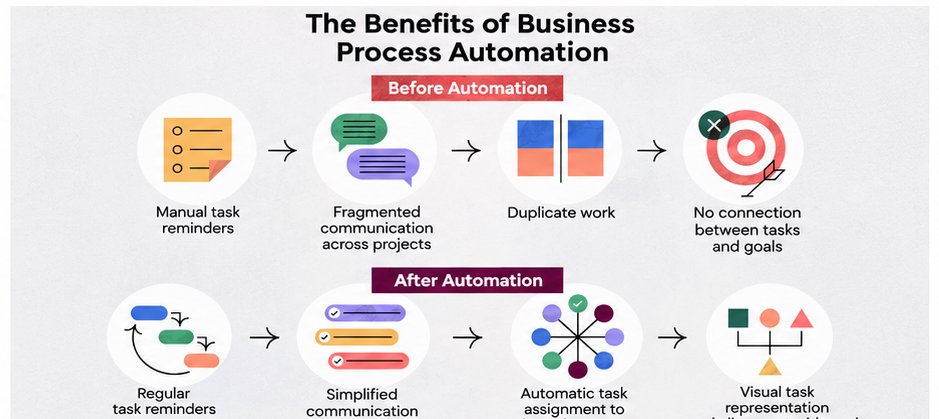 The Benefits of Business Process Automation: Before Automation vs After Automation Workflow Comparison
In short: BPA primarily increases efficiency, optimizes processes and standardizes procedures. We will now take a closer look at these three advantages.
More efficiency
One of the biggest benefits of BPA is that it increases efficiency and gives your team the time they need to work at their best. You can save time and avoid errors, for example by automating a daily reminder of the agenda for project participants.
This not only improves productivity, but the additional free time can also contribute to a higher quality of work.
The numbers also confirm this: Morningstar saves 14.976 hours per year in the research team with automated workflows, and the Central Technology Team gained back 1.972 working days per year - an equivalent of 758.600 US dollars.
Process optimization
Business processes are not always easy for both large and small companies. This is because there are so many different processes. From planning and budgeting to human resources management and employee onboarding, there are numerous repetitive tasks that occur behind the scenes of almost every company.
With BPA, you can automate your processes using machine learning to improve employee and customer experiences.
Montblanc provides a practical example. The company created over 4.200 automations in Modern workflow automation platforms in a year. Automations and status updates save the team around 25 hours per month. Would you like to achieve similar results? .
Standardized processes
In addition to streamlining tasks within business operations, BPA can help the team standardize operational processes. For this purpose, the forwarding of information to those involved as well as a number of other automated processes can be automated.
It is important that all internal processes are consistent. This reduces errors and unnecessary work to a minimum and improves the company's focus.
Which business processes can be automated?
In principle, almost all recurring, rule-based tasks can be automated. In practice, project tasks, communication, data entry, customer orders, payroll accounting and lead nurturing are particularly suitable. The tricky part is knowing exactly how to do this.
It's best to start with simple tasks and slowly work your way up to more complex automation processes. Common tasks that companies automate include project deliverables, data entry, sales orders, and even payroll - all of which can save time and money for your team.
Your options depend on the tools and software you already use. Therefore, you should first find out about the functions available before you get too deep into automation. If you're new to using tools, you should find out if workflow management software is right for you.
Here are some of the most common tasks where you can use business process automation.
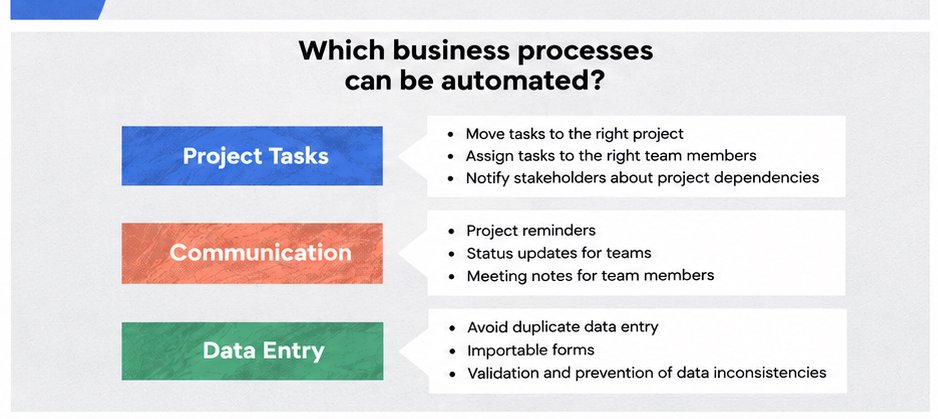 Which business processes can be automated: Project Tasks, Communication, and Data Entry
Project tasks
Most projects you work on have a number of tasks that need to be completed - called dependencies. While some teams use automation to create better to-do lists, other teams prefer methods like Kanban boards or Gantt chart-like timelines. No matter which method you prefer, automation can help create these tasks and, in some cases, even help complete them.
You can use project task automation in the following ways:
Move tasks to the correct project
Assign tasks to appropriate teammate
Notify stakeholders of project dependencies
Set and postpone due dates
Submit work at the right time
By automating routine work such as project task management, you can automatically assign tasks to team members, easily move due dates, and notify stakeholders of changes.
Communication
Automating communication processes is another way to optimize recurring tasks. From project reminders to weekly team updates, these small (but time-consuming) tasks can be an important first step toward creating a smarter business process.
You can use the automation of communication processes in the following ways:
Send project reminders
Status updates for teams
Meeting minutes for team members
Send customer-focused communications
Send email series to new customers
Data entry
Most companies rely on automation to simplify data entry. It is a tedious job that is also very time-consuming. Data entry is a repetitive activity that typically needs to be done monthly or weekly.
You can use data entry automation in the following ways:
Avoid double data entry
Import forms
Report and avoid data inconsistencies
Forward data to appropriate stakeholders
Save customer information
Aside from these features, automated data entry that would otherwise be done manually can help reduce operational costs.
Customer orders
With the right CRM system in place, automation can help capture and route sales order data. This can be helpful for a number of reasons, such as servicing customers and personalizing marketing campaigns.
You can use automation for sales orders as follows:
Serve customers
Personalize marketing campaigns
Predict product success
Track market trends
These automations give your team more time for strategic tasks.
Yıldız Ventures shows how effective this can be. By automating administrative tasks, the company reduced routine work by 35% with Modern workflow automation platforms. At the same time, the proportion of strategic work increased by 80%. Discover how automation also relieves your team: .
Payroll accounting
Payroll is a necessary task in every company. Anyone who still carries out payroll accounting manually is losing out on the benefits of automating the process. Similar to other business processes we described above, automation can eliminate errors, create faster procedures, and save you from sitting in the office for hours.
You can use payroll automation in the following ways:
Provide payslip
Generate payroll reports
Provide payroll for team members
Adjust working hours for paid vacation
Assist employees with tax returns
Make changes to benefits to enable employee benefits
One of the tasks you should definitely automate is payroll because it can save your team a lot of work.
Lead nurturing
Automating the customer lifecycle requires seamless integration between intake forms and enterprise customer relationship management platforms, as detailed in our analysis of CRM architecture.
Another process you can easily automate with the right technology is lead nurturing. This can be in the form of email programs through a welcome or reactivation email series, or through content promotion such as targeted ads.
You can use lead nurturing automation in the following ways:
Create campaign workflows
Send relevant content to potential customers
Send emails to maintain customer contacts
Save personalized lead data
There are numerous ways to use automated lead nurturing to your advantage. However, be sure to continually improve campaigns using Key Performance Indicators (KPIs). Setting up a campaign and then forgetting about it is the worst thing you can do. So make sure you continue to grow based on past performance.
How to identify and prioritize suitable processes
Not every process is suitable as a starting point. Before you automate, you should systematically check which processes promise the greatest benefit with manageable effort. Recurring, rule-based tasks with a clear trigger, structured data and a lot of time are ideal.
Look for these features when choosing:
High repetition rate and a clear trigger, such as a form, an email or a status change.
Structured, digitally available data and fixed rules for forwarding, approval and escalation.
Lots of manual handovers, measurable error costs and clear process ownership.
Processes that are not yet stable or where every process is different are less suitable. You should first document and optimize such processes. Even highly strategic decisions are better left in human hands; Here the automation can only prepare information and make suggestions.
A simple evaluation scheme helps with prioritization: Assign points for each process for time spent, error rate, data quality, integration ability and the benefit to sales or service. This way you can quickly see which process is suitable as a first pilot project, without every exception triggering a major project.
Indeed also benefited from this targeted approach. After automating manual processes, the company reduced manual ticket management efforts by 42% with Modern workflow automation platforms. This equates to savings of 300.000 US dollars. Check which processes are worthwhile in your team: .
Examples of business process automation
Now that you know some of the most common tasks to automate, let's look at a concrete example of BPA in practice. A good plan takes both customers and the customer experience into account.
Here are some examples that show how you can use automation to your advantage.
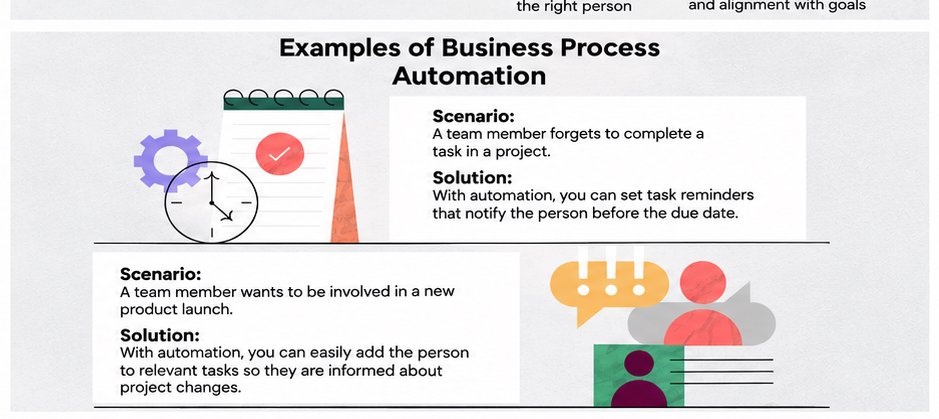 Examples of Business Process Automation Scenarios and Solutions
Example 1: Automate project tasks
Scenario: You are working on a new project and notice that a task is not yet completed. You contact the team member to ask about the status of the task and find out that the task is completed but they forgot to break the corresponding dependency. Therefore, several sub-dependencies are now overdue.
Solution: Use automation to set task reminders when due dates are approaching without you having to intervene. This would have prevented tasks from exceeding their due date in the first place. You would also have saved the time you and the party spent resolving the issue.
Example 2: Automating team communication
Scenario: The division manager asks you to involve him in the new product launch so he can stay in the loop. You plan a team meeting to go over the work breakdown structure with the people involved. You check the division manager's calendar, but he isn't available for any of the appointments the rest of the team has scheduled.
Solution: Automation makes it easy to add stakeholders to tasks to keep them updated on project changes and upcoming due dates. Not only are they notified automatically, but they can also customize their own notification preferences to align with the workflows that are most important to them.
Steps to Implement Business Process Automation
A successful implementation of business process automation requires a structured approach. Take the following steps to create a solid foundation:
-
Identify and prioritize processes: Analyze your existing workflows and determine which processes are best suited for automation. Start with repetitive, error-prone tasks that require a lot of manual effort.
-
Define goals and success criteria: Determine what results you want to achieve, such as saved working hours, reduced error rates or shortened processing times. Morningstar, for example, reduced the processing time for applications in the retirement planning team by two weeks.
-
Choose the right tool: Evaluate automation solutions based on your needs. Pay attention to integration options, ease of use and scalability.
-
Set up standardized input processes: Replace unstructured input paths with standardized forms and workflows. Morningstar replaced manual Word documents with standardized incoming processes with automatic prioritization and evaluation.
-
Start pilot phase and iterate: Test the automation in a limited area first. Use predefined Workflows as a starting point. Collect feedback, optimize workflows and gradually scale to additional processes.
-
Measure and optimize results: Portfolios and reports allow you to use data to verify the effectiveness of your automation. Morningstar saves 600.000 US dollars annually through AI-powered workflows.
Risks, data protection and governance in automation
Automation only develops its benefits with clear guidelines. Without governance, unclear responsibilities, data flows that are difficult to understand and isolated solutions arise that are difficult to control later. Especially in Germany, you should think about data protection and compliance right from the start.
You should ensure these points:
Data protection according to GDPR: Process personal data in accordance with the rules and clearly define roles, rights and storage locations.
Data Quality: An automated workflow is only as reliable as the data it processes.
Access rights and security: Assign permissions and interfaces in a controlled manner and not across the board.
Traceability: Document critical decisions and approvals in an audit trail.
Change Management: Explain to your team why a workflow is being introduced and how it will improve daily work.
Human control remains important in sensitive areas: You should build in fixed checking mechanisms for high-risk releases or personal data. This means your workflows work quickly without losing control. Modern AI solutions like AI Teammates operate within enterprise-grade access controls: every action is auditable and reversible, and customer data is not used to train models.
Software for automating business processes
The prerequisite for setting up an effective business process is the right automation software. A good tool should provide the ability to create custom workflows, deliver results quickly, and easily make changes when needed.
Of course, there are numerous features that can improve your company's technological intelligence, with a few in particular standing out.
Your tool should be able to:
Optimize workflows
Visualize work
Back up data
Provide a simple user interface
Set priorities and deadlines
Create custom steps
Reduce unnecessary effort
All of these features not only make creating reliable workflows easier, but also reduce bottlenecks. Even if they seem small at the moment, they accumulate over time and lead to efficiency problems. Luckily, with the right BPA software and automation technology, you're well prepared.
Automate your work with Modern workflow automation platforms
Automate business processes and achieve results
Automating business processes saves time, reduces errors, and frees your team to focus on strategic tasks. Whether it's rule-based workflows, AI-driven decisions, or step-by-step implementation, the key is to start with the right processes and use the right software. and discover how automation can transform your workflows.
Frequently asked questions about business process automation
The costs vary greatly depending on the scope, technology used and company size. Many platforms offer tiered pricing models, and the ROI is often evident in the first few months through saved man hours and reduced error costs.


